CSS Variables
The var() function is used to insert the value of a CSS variable.
CSS variables have access to the DOM, which means that you can create variables with local or global scope, change the variables with JavaScript, and change the variables based on media queries.
A good way to use CSS variables is when it comes to the colors of your design. Instead of copy and paste the same colors over and over again, you can place them in variables.
CSS Declare a Variable
CSS variables can have a global or local scope.
Global variables can be accessed through the entire document, while local variables can be used only inside the selector where it is declared.
To create a global variable, declare it inside the :root selector. The :root selector matches the document’s root element.
To create a local variable, declare it inside the selector that is going to use it.
A CSS variable name must begin with two dashes (–) and is case sensitive!
Syntax
:root {
–primary-bg-color: green; /* global scope */
}.note {
–note-bg: yellow; /* local scope */
}
CSS Variables Example
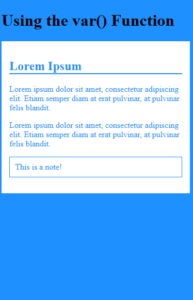
Here, we declare two global variables (–primary-bg-color and –primary-color).
Then, we use the var() function to insert the value of the variables later in the style sheet:
Example
123456789101112131415161718192021222324252627282930313233343536373839404142
<!DOCTYPE html><html><head><style>:root { --primary-bg-color: #1e90ff; --primary-color: #ffffff; } body { background-color: var(--primary-bg-color);} .container { color: var(--primary-bg-color); background-color: var(--primary-color); padding: 15px;} .container h2 { border-bottom: 2px solid var(--primary-bg-color);} .container .note { border: 1px solid var(--primary-bg-color); padding: 10px;}</style></head><body> <h1>Using the var() Function</h1> <div class="container"> <h2>Lorem Ipsum</h2> <p>Lorem ipsum dolor sit amet, consectetur adipiscing elit. Etiam semper diam at erat pulvinar, at pulvinar felis blandit.</p> <p>Lorem ipsum dolor sit amet, consectetur adipiscing elit. Etiam semper diam at erat pulvinar, at pulvinar felis blandit.</p> <p class="note">This is a note!</p></div> </body></html>
Result