
HTML Entities
Reserved characters in HTML must be replaced with entities:
- < (less than) = <
- > (greater than) = >
HTML Character Entities
Some characters are reserved in HTML.
If you use the less than (<) or greater than (>) signs in your HTML text, the browser might mix them with tags.
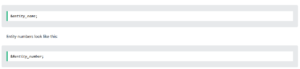
Entity names or entity numbers can be used to display reserved HTML characters.
Entity names look like this:
Non-breaking Space
A commonly used HTML entity is the non-breaking space:
A non-breaking space is a space that will not break into a new line.
Two words separated by a non-breaking space will stick together (not break into a new line). This is handy when breaking the words might be disruptive.
Examples:
- § 10
- 10 km/h
- 10 PM
Another common use of the non-breaking space is to prevent browsers from truncating spaces in HTML pages.
If you write 10 spaces in your text, the browser will remove 9 of them. To add real spaces to your text, you can use the character entity.
Some Useful HTML Character Entities
| Result | Description | Name | Number | |
|---|---|---|---|---|
| non-breaking space | |   | ||
| < | less than | < | < | |
| > | greater than | > | > | |
| & | ampersand | & | & | |
| “ | double quotation mark | " | " | |
| ‘ | single quotation mark | ' | ' | |
| ¢ | cent | ¢ | ¢ | |
| £ | pound | £ | £ | |
| ¥ | yen | ¥ | ¥ | |
| € | euro | € | € | |
| © | copyright | © | © | |
| ® | registered trademark | ® | ® | |
| ™ | trademark | ™ | ™ |
Combining Diacritical Marks
A diacritical mark is a “glyph” added to a letter.
Some diacritical marks, like grave ( ̀) and acute ( ́) are called accents.
Diacritical marks can be used in combination with alphanumeric characters to produce a character that is not present in the character set (encoding) used in the page.
Here are some examples:
| Mark | Character | Construct | Result | |
|---|---|---|---|---|
| ̀ | a | à | à | |
| ́ | a | á | á | |
| ̂ | a | â | â | |
| ̃ | a | ã | ã | |
| ̀ | O | Ò | Ò | |
| ́ | O | Ó | Ó | |
| ̂ | O | Ô | Ô | |
| ̃ | O | Õ | Õ |