
CSS overflow Property
Definition and Usage
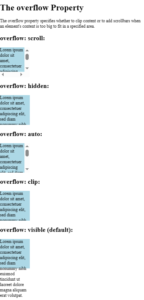
The overflow property specifies what should happen if content overflows an element’s box.
This property specifies whether to clip content or to add scrollbars when an element’s content is too big to fit in a specified area.
Example
|
1 2 3 4 5 6 7 8 9 10 11 12 13 14 15 16 17 18 19 20 21 22 23 24 25 26 27 28 29 30 31 32 33 34 35 36 37 38 39 40 41 42 43 44 45 46 47 48 49 50 51 52 53 54 55 56 57 58 59 60 61 62 63 |
<!DOCTYPE html> <html> <head> <style> div.ex1 { background-color: lightblue; width: 110px; height: 110px; overflow: scroll; } div.ex2 { background-color: lightblue; width: 110px; height: 110px; overflow: hidden; } div.ex3 { background-color: lightblue; width: 110px; height: 110px; overflow: auto; } div.ex4 { background-color: lightblue; width: 110px; height: 110px; overflow: clip; } div.ex5 { background-color: lightblue; width: 110px; height: 110px; overflow: visible; } </style> </head> <body> <h1>The overflow Property</h1> <p>The overflow property specifies whether to clip content or to add scrollbars when an element's content is too big to fit in a specified area.</p> <h2>overflow: scroll:</h2> <div class="ex1">Lorem ipsum dolor sit amet, consectetuer adipiscing elit, sed diam nonummy nibh euismod tincidunt ut laoreet dolore magna aliquam erat volutpat.</div> <h2>overflow: hidden:</h2> <div class="ex2">Lorem ipsum dolor sit amet, consectetuer adipiscing elit, sed diam nonummy nibh euismod tincidunt ut laoreet dolore magna aliquam erat volutpat.</div> <h2>overflow: auto:</h2> <div class="ex3">Lorem ipsum dolor sit amet, consectetuer adipiscing elit, sed diam nonummy nibh euismod tincidunt ut laoreet dolore magna aliquam erat volutpat.</div> <h2>overflow: clip:</h2> <div class="ex4">Lorem ipsum dolor sit amet, consectetuer adipiscing elit, sed diam nonummy nibh euismod tincidunt ut laoreet dolore magna aliquam erat volutpat.</div> <h2>overflow: visible (default):</h2> <div class="ex5">Lorem ipsum dolor sit amet, consectetuer adipiscing elit, sed diam nonummy nibh euismod tincidunt ut laoreet dolore magna aliquam erat volutpat.</div> </body> </html> |
Result
Property Values
| Value | Description | Demo |
|---|---|---|
| visible | The overflow is not clipped. It renders outside the element’s box. This is default | |
| hidden | The overflow is clipped, and the rest of the content will be invisible. Content can be scrolled programmatically (e.g. by setting scrollLeft or scrollTo()) | |
| clip | The overflow is clipped, and the rest of the content will be invisible. Forbids scrolling, including programmatic scrolling. | |
| scroll | The overflow is clipped, but a scroll-bar is added to see the rest of the content | |
| auto | If overflow is clipped, a scroll-bar should be added to see the rest of the content | |
| initial | Sets this property to its default value. Read about initial | |
| inherit | Inherits this property from its parent element. Read about inherit |
CSS overflow-anchor Property
Definition and Usage
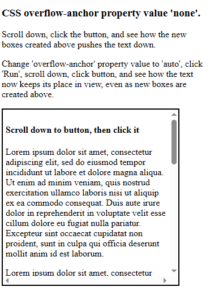
The overflow-anchor property makes it possible to turn off scroll anchoring.
Scroll anchoring is a feature in the browser that prevents a viewable area that is scrolled into focus to move when new content is loaded above. This is typically a problem on a slow connection if the user scrolls down and starts reading before the page is fully loaded.
Example
|
1 2 3 4 5 6 7 8 9 10 11 12 13 14 15 16 17 18 19 20 21 22 23 24 25 26 27 28 29 30 31 32 33 34 35 36 37 38 39 40 41 42 43 44 45 46 47 48 49 50 51 52 53 54 |
<!DOCTYPE html> <html> <head> <style> #container { padding: 5px; width: 300px; aspect-ratio: 1; border: solid black 2px; overflow: scroll; overflow-anchor: none; } .blue { background-color: lightblue; height: 20px; width: 80%; animation: contentExpand 5s infinite; } .greenDiv{ background-color: lightgreen; width: 80%; margin: 3px; aspect-ratio: 4/1; } </style> </head> <body> <h3>CSS overflow-anchor property value 'none'.</h3> <p>Scroll down, click the button, and see how the new boxes created above pushes the text down.</p> <p>Change 'overflow-anchor' property value to 'auto', click 'Run', scroll down, click button, and see how the text now keeps its place in view, even as new boxes are created above.</p> <div id="container"> <div id="newBoxes"></div> <h4>Scroll down to button, then click it</h4> <p>Lorem ipsum dolor sit amet, consectetur adipiscing elit, sed do eiusmod tempor incididunt ut labore et dolore magna aliqua. Ut enim ad minim veniam, quis nostrud exercitation ullamco laboris nisi ut aliquip ex ea commodo consequat. Duis aute irure dolor in reprehenderit in voluptate velit esse cillum dolore eu fugiat nulla pariatur. Excepteur sint occaecat cupidatat non proident, sunt in culpa qui officia deserunt mollit anim id est laborum.</p> <p>Lorem ipsum dolor sit amet, consectetur adipiscing elit, sed do eiusmod tempor incididunt ut labore et dolore magna aliqua. Ut enim ad minim veniam, quis nostrud exercitation ullamco laboris nisi ut aliquip ex ea commodo consequat. Duis aute irure dolor in reprehenderit in voluptate velit esse cillum dolore eu fugiat nulla pariatur. Excepteur sint occaecat cupidatat non proident, sunt in culpa qui officia deserunt mollit anim id est laborum.</p> <button onclick="addBox()">Click me</button> <p>Lorem ipsum dolor sit amet, consectetur adipiscing elit, sed do eiusmod tempor incididunt ut labore et dolore magna aliqua. Ut enim ad minim veniam, quis nostrud exercitation ullamco laboris nisi ut aliquip ex ea commodo consequat. Duis aute irure dolor in reprehenderit in voluptate velit esse cillum dolore eu fugiat nulla pariatur. Excepteur sint occaecat cupidatat non proident, sunt in culpa qui officia deserunt mollit anim id est laborum.</p> <p>Lorem ipsum dolor sit amet, consectetur adipiscing elit, sed do eiusmod tempor incididunt ut labore et dolore magna aliqua. Ut enim ad minim veniam, quis nostrud exercitation ullamco laboris nisi ut aliquip ex ea commodo consequat. Duis aute irure dolor in reprehenderit in voluptate velit esse cillum dolore eu fugiat nulla pariatur. Excepteur sint occaecat cupidatat non proident, sunt in culpa qui officia deserunt mollit anim id est laborum.</p> </div> <script> function addBox(){ let newBoxesDiv = document.querySelector("#newBoxes"); let newDiv = document.createElement("div"); newDiv.className = "greenDiv"; newBoxesDiv.appendChild(newDiv); } </script> </body> </html> |
Result
Property Values
| Value | Description |
|---|---|
| auto | Default value. Scroll anchoring is enabled |
| none | Scroll anchoring is disabled |
| initial | Sets this property to its default value. Read about initial |
| inherit | Inherits this property from its parent element. Read about inherit |
CSS overflow-wrap Property
Definition and Usage
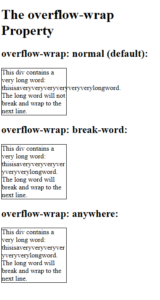
The overflow-wrap property specifies whether or not the browser can break lines with long words, if they overflow the container.
Example
|
1 2 3 4 5 6 7 8 9 10 11 12 13 14 15 16 17 18 19 20 21 22 23 24 25 26 27 28 29 30 31 32 33 34 35 36 37 |
<!DOCTYPE html> <html> <head> <style> div { width: 150px; border: 1px solid #000000; } div.a { overflow-wrap: normal; } div.b { overflow-wrap: break-word; } div.c { overflow-wrap: anywhere; } </style> </head> <body> <h1>The overflow-wrap Property</h1> <h2>overflow-wrap: normal (default):</h2> <div class="a">This div contains a very long word: thisisaveryveryveryveryveryverylongword. The long word will not break and wrap to the next line.</div> <h2>overflow-wrap: break-word:</h2> <div class="b">This div contains a very long word: thisisaveryveryveryveryveryverylongword. The long word will break and wrap to the next line.</div> <h2>overflow-wrap: anywhere:</h2> <div class="c">This div contains a very long word: thisisaveryveryveryveryveryverylongword. The long word will break and wrap to the next line.</div> </body> </html> |
Result
Property Values
| Value | Description | Demo |
|---|---|---|
| normal | Long words will not break, even if they overflow the container. This is default | |
| anywhere | Long words will break if they overflow the container | |
| break-word | Long words will break if they overflow the container | |
| initial | Sets this property to its default value. Read about initial | |
| inherit | Inherits this property from its parent element. Read about inherit |
CSS overflow-x Property
Definition and Usage
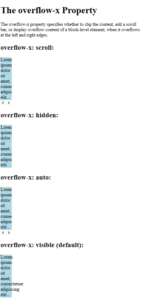
The overflow-x property specifies whether to clip the content, add a scroll bar, or display overflow content of a block-level element, when it overflows at the left and right edges.
Example
|
1 2 3 4 5 6 7 8 9 10 11 12 13 14 15 16 17 18 19 20 21 22 23 24 25 26 27 28 29 30 31 32 33 34 35 36 37 38 39 40 41 42 43 44 45 46 47 48 49 |
<!DOCTYPE html> <html> <head> <style> div.ex1 { background-color: lightblue; width: 40px; overflow-x: scroll; } div.ex2 { background-color: lightblue; width: 40px; overflow-x: hidden; } div.ex3 { background-color: lightblue; width: 40px; overflow-x: auto; } div.ex4 { background-color: lightblue; width: 40px; overflow-x: visible; } </style> </head> <body> <h1>The overflow-x Property</h1> <p>The overflow-x property specifies whether to clip the content, add a scroll bar, or display overflow content of a block-level element, when it overflows at the left and right edges.</p> <h2>overflow-x: scroll:</h2> <div class="ex1">Lorem ipsum dolor sit amet, consectetuer adipiscing elit...</div> <h2>overflow-x: hidden:</h2> <div class="ex2">Lorem ipsum dolor sit amet, consectetuer adipiscing elit..</div> <h2>overflow-x: auto:</h2> <div class="ex3">Lorem ipsum dolor sit amet, consectetuer adipiscing elit...</div> <h2>overflow-x: visible (default):</h2> <div class="ex4">Lorem ipsum dolor sit amet, consectetuer adipiscing elit...</div> </body> </html> |
Result
Property Values
| Value | Description | Demo |
|---|---|---|
| visible | The content is not clipped, and it may be rendered outside the left and right edges. This is default | |
| hidden | The content is clipped – and no scrolling mechanism is provided | |
| scroll | The content is clipped and a scrolling mechanism is provided | |
| auto | Should cause a scrolling mechanism to be provided for overflowing boxes | |
| initial | Sets this property to its default value. Read about initial | |
| inherit | Inherits this property from its parent element. Read about inherit |
CSS overflow-y Property
Definition and Usage
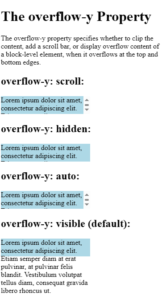
The overflow-y property specifies whether to clip the content, add a scroll bar, or display overflow content of a block-level element, when it overflows at the top and bottom edges.
Example
|
1 2 3 4 5 6 7 8 9 10 11 12 13 14 15 16 17 18 19 20 21 22 23 24 25 26 27 28 29 30 31 32 33 34 35 36 37 38 39 40 41 42 43 44 45 46 47 48 49 50 51 52 53 |
<!DOCTYPE html> <html> <head> <style> div.ex1 { background-color: lightblue; height: 40px; width: 200px; overflow-y: scroll; } div.ex2 { background-color: lightblue; height: 40px; width: 200px; overflow-y: hidden; } div.ex3 { background-color: lightblue; height: 40px; width: 200px; overflow-y: auto; } div.ex4 { background-color: lightblue; height: 40px; width: 200px; overflow-y: visible; } </style> </head> <body> <h1>The overflow-y Property</h1> <p>The overflow-y property specifies whether to clip the content, add a scroll bar, or display overflow content of a block-level element, when it overflows at the top and bottom edges.</p> <h2>overflow-y: scroll:</h2> <div class="ex1">Lorem ipsum dolor sit amet, consectetur adipiscing elit. Etiam semper diam at erat pulvinar, at pulvinar felis blandit. Vestibulum volutpat tellus diam, consequat gravida libero rhoncus ut.</div> <h2>overflow-y: hidden:</h2> <div class="ex2">Lorem ipsum dolor sit amet, consectetur adipiscing elit. Etiam semper diam at erat pulvinar, at pulvinar felis blandit. Vestibulum volutpat tellus diam, consequat gravida libero rhoncus ut.</div> <h2>overflow-y: auto:</h2> <div class="ex3">Lorem ipsum dolor sit amet, consectetur adipiscing elit. Etiam semper diam at erat pulvinar, at pulvinar felis blandit. Vestibulum volutpat tellus diam, consequat gravida libero rhoncus ut.</div> <h2>overflow-y: visible (default):</h2> <div class="ex4">Lorem ipsum dolor sit amet, consectetur adipiscing elit. Etiam semper diam at erat pulvinar, at pulvinar felis blandit. Vestibulum volutpat tellus diam, consequat gravida libero rhoncus ut.</div> </body> </html> |
Result
CSS overscroll-behavior Property
Definition and Usage
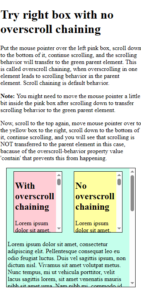
The overscroll-behavior property is used to turn off scroll chaining or overscroll affordance on an element when you try to scroll past the scroll boundary.
The overscroll-behavior property is a shorthand for the following properties:
Values for the overscroll-behavior property can be set in different ways:
Example
|
1 2 3 4 5 6 7 8 9 10 11 12 13 14 15 16 17 18 19 20 21 22 23 24 25 26 27 28 29 30 31 32 33 34 35 36 37 38 39 40 41 42 43 44 45 46 47 48 49 50 51 52 53 54 55 56 57 58 59 60 61 |
<!DOCTYPE html> <html> <head> <style> div { margin: 5px 15px; padding: 3px; border: solid black 1px; overflow: auto; } #flex-container { display: flex; flex-wrap: wrap; background-color: rgb(197, 255, 236); height: 300px; } #flex-container > div { flex: 1; height: 150px; } #pinkDiv { background-color: rgb(255, 205, 213); } #yellowDiv { background-color: rgb(255, 255, 161); overscroll-behavior: contain; } </style> </head> <body> <h1>Try right box with no overscroll chaining</h1> <p>Put the mouse pointer over the left pink box, scroll down to the bottom of it, continue scrolling, and the scrolling behavior will transfer to the green parent element. This is called overscroll chaining, when overscrolling in one element leads to scrolling behavior in the parent element. Scroll chaining is default behavior.</p> <p><strong>Note: </strong>You might need to move the mouse pointer a little bit inside the pink box after scrolling down to transfer scrolling behavior to the green parent element.</p> <p>Now, scroll to the top again, move mouse pointer over to the yellow box to the right, scroll down to the bottom of it, continue scrolling, and you will see that scrolling is NOT transferred to the parent element in this case, bacause of the overscroll-behavior property value 'contain' that prevents this from happening.</p> <div id="flex-container"> <div id="pinkDiv"> <h2>With overscroll chaining</h2> <p>Lorem ipsum dolor sit amet, consectetur adipiscing elit. Pellentesque consequat leo eu odio feugiat luctus. Duis vel sagittis ipsum, non dictum nisl. Vivamus sit amet volutpat metus. Nunc tempus, mi ut vehicula porttitor, velit lacus sagittis lorem, sit amet venenatis mauris nibh sit amet urna. Nam nibh mi, commodo id diam eu, congue suscipit nunc. Vestibulum scelerisque dui tempus tincidunt luctus. Donec placerat quis neque vel ultrices. Pellentesque dignissim placerat orci sed cursus. Ut convallis leo sapien, vitae ornare nulla sodales at. Suspendisse ut vestibulum erat. Sed ut fermentum tortor. Integer quis tellus eget nisi pharetra pharetra non vitae magna. Cras ultricies, nulla id imperdiet varius, nisi odio finibus diam, at finibus lacus risus vel dui. Ut euismod consequat libero eu pharetra.</p> </div> <div id="yellowDiv"> <h2>No overscroll chaining</h2> <p>Lorem ipsum dolor sit amet, consectetur adipiscing elit. Pellentesque consequat leo eu odio feugiat luctus. Duis vel sagittis ipsum, non dictum nisl. Vivamus sit amet volutpat metus. Nunc tempus, mi ut vehicula porttitor, velit lacus sagittis lorem, sit amet venenatis mauris nibh sit amet urna. Nam nibh mi, commodo id diam eu, congue suscipit nunc. Vestibulum scelerisque dui tempus tincidunt luctus. Donec placerat quis neque vel ultrices. Pellentesque dignissim placerat orci sed cursus. Ut convallis leo sapien, vitae ornare nulla sodales at. Suspendisse ut vestibulum erat. Sed ut fermentum tortor. Integer quis tellus eget nisi pharetra pharetra non vitae magna. Cras ultricies, nulla id imperdiet varius, nisi odio finibus diam, at finibus lacus risus vel dui. Ut euismod consequat libero eu pharetra.</p> </div> <p>Lorem ipsum dolor sit amet, consectetur adipiscing elit. Pellentesque consequat leo eu odio feugiat luctus. Duis vel sagittis ipsum, non dictum nisl. Vivamus sit amet volutpat metus. Nunc tempus, mi ut vehicula porttitor, velit lacus sagittis lorem, sit amet venenatis mauris nibh sit amet urna. Nam nibh mi, commodo id diam eu, congue suscipit nunc. Vestibulum scelerisque dui tempus tincidunt luctus. Donec placerat quis neque vel ultrices. Pellentesque dignissim placerat orci sed cursus. Ut convallis leo sapien, vitae ornare nulla sodales at. Suspendisse ut vestibulum erat. Sed ut fermentum tortor. Integer quis tellus eget nisi pharetra pharetra non vitae magna. Cras ultricies, nulla id imperdiet varius, nisi odio finibus diam, at finibus lacus risus vel dui. Ut euismod consequat libero eu pharetra.</p> <p>Lorem ipsum dolor sit amet, consectetur adipiscing elit. Pellentesque consequat leo eu odio feugiat luctus. Duis vel sagittis ipsum, non dictum nisl. Vivamus sit amet volutpat metus. Nunc tempus, mi ut vehicula porttitor, velit lacus sagittis lorem, sit amet venenatis mauris nibh sit amet urna. Nam nibh mi, commodo id diam eu, congue suscipit nunc. Vestibulum scelerisque dui tempus tincidunt luctus. Donec placerat quis neque vel ultrices. Pellentesque dignissim placerat orci sed cursus. Ut convallis leo sapien, vitae ornare nulla sodales at. Suspendisse ut vestibulum erat. Sed ut fermentum tortor. Integer quis tellus eget nisi pharetra pharetra non vitae magna. Cras ultricies, nulla id imperdiet varius, nisi odio finibus diam, at finibus lacus risus vel dui. Ut euismod consequat libero eu pharetra.</p> </div> </body> </html> |
Result
Property Values
| Value | Description |
|---|---|
| auto | Allows scroll chaining and overscroll affordance behavior. This is default |
| contain | Allows overscroll affordance behavior, but not scroll chaining. |
| none | Does not allow overscroll affordance or scroll chaining behavior. |
| initial | Sets this property to its default value. Read about initial |
| inherit | Inherits this property from its parent element. Read about inherit |
CSS overscroll-behavior-x Property
Definition and Usage
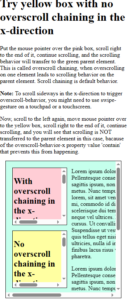
The overscroll-behavior-x property is used to turn off scroll chaining or overscroll affordance on an element when you try to scroll past the scroll boundary in the x-direction.
Example
|
1 2 3 4 5 6 7 8 9 10 11 12 13 14 15 16 17 18 19 20 21 22 23 24 25 26 27 28 29 30 31 32 33 34 35 36 37 38 39 40 41 42 43 44 45 46 47 48 49 50 51 52 53 54 55 56 57 58 59 60 61 62 63 64 65 66 67 68 69 70 71 72 73 |
<!DOCTYPE html> <html> <head> <style> #container, #pinkDiv, #yellowDiv { margin: 15px; padding: 3px; border: solid black 1px; overflow: auto; } #container { background-color: rgb(197, 255, 236); height: 370px; } #container p { width: 200%; } #leftDiv { float: left; width: 60%; } #pinkDiv, #yellowDiv { height: 150px; width: 80%; } #pinkDiv { background-color: rgb(255, 205, 213); } #yellowDiv { background-color: rgb(255, 255, 161); overscroll-behavior-x: contain; } </style> </head> <body> <h1>Try yellow box with no overscroll chaining in the x-direction</h1> <p>Put the mouse pointer over the pink box, scroll right to the end of it, continue scrolling, and the scrolling behavior will transfer to the green parent element. This is called overscroll chaining, when overscrolling on one element leads to scrolling behavior on the parent element. Scroll chaining is default behavior.</p> <p><strong>Note: </strong>To scroll sideways in the x-direction to trigger overscroll-behavior, you might need to use swipe-gesture on a touchpad or a touchscreen.</p> <p>Now, scroll to the left again, move mouse pointer over to the yellow box, scroll right to the end of it, continue scrolling, and you will see that scrolling is NOT transferred to the parent element in this case, bacause of the overscroll-behavior-x property value 'contain' that prevents this from happening.</p> <div id="container"> <div id="leftDiv"> <div id="pinkDiv"> <h2>With overscroll chaining in the x-direction</h2> <p>Lorem ipsum dolor sit amet, consectetur adipiscing elit. Pellentesque consequat leo eu odio feugiat luctus. Duis vel sagittis ipsum, non dictum nisl. Vivamus sit amet volutpat metus. Nunc tempus, mi ut vehicula porttitor, velit lacus sagittis lorem, sit amet venenatis mauris nibh sit amet urna. Nam nibh mi, commodo id diam eu, congue suscipit nunc. Vestibulum scelerisque dui tempus tincidunt luctus. Donec placerat quis neque vel ultrices. Pellentesque dignissim placerat orci sed cursus. Ut convallis leo sapien, vitae ornare nulla sodales at. Suspendisse ut vestibulum erat. Sed ut fermentum tortor. Integer quis tellus eget nisi pharetra pharetra non vitae magna. Cras ultricies, nulla id imperdiet varius, nisi odio finibus diam, at finibus lacus risus vel dui. Ut euismod consequat libero eu pharetra.</p> </div> <div id="yellowDiv"> <h2>No overscroll chaining in the x-direction</h2> <p>Lorem ipsum dolor sit amet, consectetur adipiscing elit. Pellentesque consequat leo eu odio feugiat luctus. Duis vel sagittis ipsum, non dictum nisl. Vivamus sit amet volutpat metus. Nunc tempus, mi ut vehicula porttitor, velit lacus sagittis lorem, sit amet venenatis mauris nibh sit amet urna. Nam nibh mi, commodo id diam eu, congue suscipit nunc. Vestibulum scelerisque dui tempus tincidunt luctus. Donec placerat quis neque vel ultrices. Pellentesque dignissim placerat orci sed cursus. Ut convallis leo sapien, vitae ornare nulla sodales at. Suspendisse ut vestibulum erat. Sed ut fermentum tortor. Integer quis tellus eget nisi pharetra pharetra non vitae magna. Cras ultricies, nulla id imperdiet varius, nisi odio finibus diam, at finibus lacus risus vel dui. Ut euismod consequat libero eu pharetra.</p> </div> </div> <p>Lorem ipsum dolor sit amet, consectetur adipiscing elit. Pellentesque consequat leo eu odio feugiat luctus. Duis vel sagittis ipsum, non dictum nisl. Vivamus sit amet volutpat metus. Nunc tempus, mi ut vehicula porttitor, velit lacus sagittis lorem, sit amet venenatis mauris nibh sit amet urna. Nam nibh mi, commodo id diam eu, congue suscipit nunc. Vestibulum scelerisque dui tempus tincidunt luctus. Donec placerat quis neque vel ultrices. Pellentesque dignissim placerat orci sed cursus. Ut convallis leo sapien, vitae ornare nulla sodales at. Suspendisse ut vestibulum erat. Sed ut fermentum tortor. Integer quis tellus eget nisi pharetra pharetra non vitae magna. Cras ultricies, nulla id imperdiet varius, nisi odio finibus diam, at finibus lacus risus vel dui. Ut euismod consequat libero eu pharetra.</p> <p>Lorem ipsum dolor sit amet, consectetur adipiscing elit. Pellentesque consequat leo eu odio feugiat luctus. Duis vel sagittis ipsum, non dictum nisl. Vivamus sit amet volutpat metus. Nunc tempus, mi ut vehicula porttitor, velit lacus sagittis lorem, sit amet venenatis mauris nibh sit amet urna. Nam nibh mi, commodo id diam eu, congue suscipit nunc. Vestibulum scelerisque dui tempus tincidunt luctus. Donec placerat quis neque vel ultrices. Pellentesque dignissim placerat orci sed cursus. Ut convallis leo sapien, vitae ornare nulla sodales at. Suspendisse ut vestibulum erat. Sed ut fermentum tortor. Integer quis tellus eget nisi pharetra pharetra non vitae magna. Cras ultricies, nulla id imperdiet varius, nisi odio finibus diam, at finibus lacus risus vel dui. Ut euismod consequat libero eu pharetra.</p> <p>Lorem ipsum dolor sit amet, consectetur adipiscing elit. Pellentesque consequat leo eu odio feugiat luctus. Duis vel sagittis ipsum, non dictum nisl. Vivamus sit amet volutpat metus. Nunc tempus, mi ut vehicula porttitor, velit lacus sagittis lorem, sit amet venenatis mauris nibh sit amet urna. Nam nibh mi, commodo id diam eu, congue suscipit nunc. Vestibulum scelerisque dui tempus tincidunt luctus. Donec placerat quis neque vel ultrices. Pellentesque dignissim placerat orci sed cursus. Ut convallis leo sapien, vitae ornare nulla sodales at. Suspendisse ut vestibulum erat. Sed ut fermentum tortor. Integer quis tellus eget nisi pharetra pharetra non vitae magna. Cras ultricies, nulla id imperdiet varius, nisi odio finibus diam, at finibus lacus risus vel dui. Ut euismod consequat libero eu pharetra.</p> </div> </body> </html> |
Result
Property Values
| Value | Description |
|---|---|
| auto | Allows scroll chaining and overscroll affordance behavior. This is default |
| contain | Allows overscroll affordance behavior, but not scroll chaining. |
| none | Does not allow overscroll affordance or scroll chaining behavior. |
| initial | Sets this property to its default value. Read about initial |
| inherit | Inherits this property from its parent element. Read about inherit |
CSS overscroll-behavior-y Property
Definition and Usage
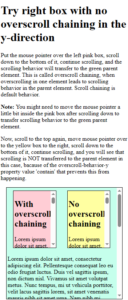
The overscroll-behavior-y property is used to turn off scroll chaining or overscroll affordance on an element when you try to scroll past the scroll boundary in y-direction.
Example
|
1 2 3 4 5 6 7 8 9 10 11 12 13 14 15 16 17 18 19 20 21 22 23 24 25 26 27 28 29 30 31 32 33 34 35 36 37 38 39 40 41 42 43 44 45 46 47 48 49 50 51 52 53 54 55 56 57 58 59 60 61 |
<!DOCTYPE html> <html> <head> <style> div { margin: 5px 15px; padding: 3px; border: solid black 1px; overflow: auto; } #flex-container { display: flex; flex-wrap: wrap; background-color: rgb(197, 255, 236); height: 300px; } #flex-container > div { flex: 1; height: 150px; } #pinkDiv { background-color: rgb(255, 205, 213); } #yellowDiv { background-color: rgb(255, 255, 161); overscroll-behavior-y: contain; } </style> </head> <body> <h1>Try right box with no overscroll chaining in the y-direction</h1> <p>Put the mouse pointer over the left pink box, scroll down to the bottom of it, continue scrolling, and the scrolling behavior will transfer to the green parent element. This is called overscroll chaining, when overscrolling in one element leads to scrolling behavior in the parent element. Scroll chaining is default behavior.</p> <p><strong>Note: </strong>You might need to move the mouse pointer a little bit inside the pink box after scrolling down to transfer scrolling behavior to the green parent element.</p> <p>Now, scroll to the top again, move mouse pointer over to the yellow box to the right, scroll down to the bottom of it, continue scrolling, and you will see that scrolling is NOT transferred to the parent element in this case, bacause of the overscroll-behavior-y property value 'contain' that prevents this from happening.</p> <div id="flex-container"> <div id="pinkDiv"> <h2>With overscroll chaining</h2> <p>Lorem ipsum dolor sit amet, consectetur adipiscing elit. Pellentesque consequat leo eu odio feugiat luctus. Duis vel sagittis ipsum, non dictum nisl. Vivamus sit amet volutpat metus. Nunc tempus, mi ut vehicula porttitor, velit lacus sagittis lorem, sit amet venenatis mauris nibh sit amet urna. Nam nibh mi, commodo id diam eu, congue suscipit nunc. Vestibulum scelerisque dui tempus tincidunt luctus. Donec placerat quis neque vel ultrices. Pellentesque dignissim placerat orci sed cursus. Ut convallis leo sapien, vitae ornare nulla sodales at. Suspendisse ut vestibulum erat. Sed ut fermentum tortor. Integer quis tellus eget nisi pharetra pharetra non vitae magna. Cras ultricies, nulla id imperdiet varius, nisi odio finibus diam, at finibus lacus risus vel dui. Ut euismod consequat libero eu pharetra.</p> </div> <div id="yellowDiv"> <h2>No overscroll chaining</h2> <p>Lorem ipsum dolor sit amet, consectetur adipiscing elit. Pellentesque consequat leo eu odio feugiat luctus. Duis vel sagittis ipsum, non dictum nisl. Vivamus sit amet volutpat metus. Nunc tempus, mi ut vehicula porttitor, velit lacus sagittis lorem, sit amet venenatis mauris nibh sit amet urna. Nam nibh mi, commodo id diam eu, congue suscipit nunc. Vestibulum scelerisque dui tempus tincidunt luctus. Donec placerat quis neque vel ultrices. Pellentesque dignissim placerat orci sed cursus. Ut convallis leo sapien, vitae ornare nulla sodales at. Suspendisse ut vestibulum erat. Sed ut fermentum tortor. Integer quis tellus eget nisi pharetra pharetra non vitae magna. Cras ultricies, nulla id imperdiet varius, nisi odio finibus diam, at finibus lacus risus vel dui. Ut euismod consequat libero eu pharetra.</p> </div> <p>Lorem ipsum dolor sit amet, consectetur adipiscing elit. Pellentesque consequat leo eu odio feugiat luctus. Duis vel sagittis ipsum, non dictum nisl. Vivamus sit amet volutpat metus. Nunc tempus, mi ut vehicula porttitor, velit lacus sagittis lorem, sit amet venenatis mauris nibh sit amet urna. Nam nibh mi, commodo id diam eu, congue suscipit nunc. Vestibulum scelerisque dui tempus tincidunt luctus. Donec placerat quis neque vel ultrices. Pellentesque dignissim placerat orci sed cursus. Ut convallis leo sapien, vitae ornare nulla sodales at. Suspendisse ut vestibulum erat. Sed ut fermentum tortor. Integer quis tellus eget nisi pharetra pharetra non vitae magna. Cras ultricies, nulla id imperdiet varius, nisi odio finibus diam, at finibus lacus risus vel dui. Ut euismod consequat libero eu pharetra.</p> <p>Lorem ipsum dolor sit amet, consectetur adipiscing elit. Pellentesque consequat leo eu odio feugiat luctus. Duis vel sagittis ipsum, non dictum nisl. Vivamus sit amet volutpat metus. Nunc tempus, mi ut vehicula porttitor, velit lacus sagittis lorem, sit amet venenatis mauris nibh sit amet urna. Nam nibh mi, commodo id diam eu, congue suscipit nunc. Vestibulum scelerisque dui tempus tincidunt luctus. Donec placerat quis neque vel ultrices. Pellentesque dignissim placerat orci sed cursus. Ut convallis leo sapien, vitae ornare nulla sodales at. Suspendisse ut vestibulum erat. Sed ut fermentum tortor. Integer quis tellus eget nisi pharetra pharetra non vitae magna. Cras ultricies, nulla id imperdiet varius, nisi odio finibus diam, at finibus lacus risus vel dui. Ut euismod consequat libero eu pharetra.</p> </div> </body> </html> |
Result
Property Values
| Value | Description |
|---|---|
| auto | Allows scroll chaining and overscroll affordance behavior. This is default |
| contain | Allows overscroll affordance behavior, but not scroll chaining. |
| none | Does not allow overscroll affordance or scroll chaining behavior. |
| initial | Sets this property to its default value. Read about initial |
| inherit | Inherits this property from its parent element. Read about inherit |
CSS scroll-behavior Property
Definition and Usage
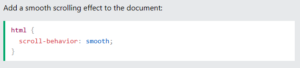
The scroll-behavior property specifies whether to smoothly animate the scroll position, instead of a straight jump, when the user clicks on a link within a scrollable box.
Example
Property Values
| Value | Description |
|---|---|
| auto | Allows a straight jump “scroll effect” between elements within the scrolling box. This is default |
| smooth | Allows a smooth animated “scroll effect” between elements within the scrolling box. |
| initial | Sets this property to its default value. Read about initial |
| inherit | Inherits this property from its parent element. Read about inherit |