HTML <header> Tag
Definition and Usage
The <header> element represents a container for introductory content or a set of navigational links.
A <header> element typically contains:
- one or more heading elements (<h1> – <h6>)
- logo or icon
- authorship information
Example
|
1 2 3 4 5 6 7 8 9 10 11 12 13 14 15 |
<!DOCTYPE html> <html> <body> <article> <header> <h3>A heading here</h3> <p>Posted by John Doe</p> <p>Some additional information here</p> </header> <p>Lorem Ipsum dolor set amet....</p> </article> </body> </html> |
A heading here
Posted by John Doe
Some additional information here
Lorem Ipsum dolor set amet.
CSS Navigation Bars
A navigation bar is an important component of web design.
Navigation bars helps users to easily navigate between different sections of a website.
Navigation bars are typically built with HTML list elements ( <ul> and <li>), and then styled with CSS to get a great look.
A navigation bar is typically located at the top or at the side of a webpage.
Navigation Bar = List of Links
A navigation bar is basically a list of links, so using the HTML <ul> and <li> elements makes perfect sense:
Example
|
1 2 3 4 5 6 7 8 9 10 11 12 13 14 15 16 17 |
<!DOCTYPE html> <html> <body> <h2>Basic HTML code for Navbar</h2> <ul> <li><a href="#home">Home</a></li> <li><a href="#news">News</a></li> <li><a href="#contact">Contact</a></li> <li><a href="#about">About</a></li> </ul> <p>Note: We use href="#" for links. In a real website this would be URLs.</p> </body> </html> |
Result
Basic HTML code for Navbar
Note: We use href=”#” for links. In a real website this would be URLs.
Now let’s remove the bullets and the margins and padding from the <ul> element:
Example explained:
- Set
list-style-type: none;– Removes the bullet points from list - Set
margin: 0;– Resets default browser margins - Set
padding: 0;– Resets default browser paddings
HTML <main> Tag
Definition and Usage
The <main> tag specifies the main content of a document.
The content inside the <main> element should be unique to the document. It should not contain any content that is repeated across documents such as sidebars, navigation links, copyright information, site logos, and search forms.
Example
|
1 2 3 4 5 6 7 8 9 10 11 12 13 14 15 16 17 18 19 20 21 22 23 24 25 26 27 28 |
<!DOCTYPE html> <html> <body> <h3>The main element</h3> <main> <h3>Most Popular Browsers</h3> <p>Chrome, Firefox, and Edge are the most used browsers today.</p> <article> <h3>Google Chrome</h3> <p>Google Chrome is a web browser developed by Google, released in 2008. Chrome is the world's most popular web browser today!</p> </article> <article> <h3>Mozilla Firefox</h3> <p>Mozilla Firefox is an open-source web browser developed by Mozilla. Firefox has been the second most popular web browser since January, 2018.</p> </article> <article> <h3>Microsoft Edge</h3> <p>Microsoft Edge is a web browser developed by Microsoft, released in 2015. Microsoft Edge replaced Internet Explorer.</p> </article> </main> </body> </html> |
Result
The main element
Most Popular Browsers
Chrome, Firefox, and Edge are the most used browsers today.
Google Chrome
Google Chrome is a web browser developed by Google, released in 2008. Chrome is the world’s most popular web browser today!
Mozilla Firefox
Mozilla Firefox is an open-source web browser developed by Mozilla. Firefox has been the second most popular web browser since January, 2018.
Microsoft Edge
Microsoft Edge is a web browser developed by Microsoft, released in 2015. Microsoft Edge replaced Internet Explorer.
HTML <section> Tag
Definition and Usage
The <section> tag defines a section in a document.
Example
|
1 2 3 4 5 6 7 8 9 10 11 12 13 14 15 16 17 18 |
<!DOCTYPE html> <html> <body> <h3>The section element</h3> <section> <h3>WWF History</h3> <p>The World Wide Fund for Nature (WWF) is an international organization working on issues regarding the conservation, research and restoration of the environment, formerly named the World Wildlife Fund. WWF was founded in 1961.</p> </section> <section> <h3>WWF's Symbol</h3> <p>The Panda has become the symbol of WWF. The well-known panda logo of WWF originated from a panda named Chi Chi that was transferred from the Beijing Zoo to the London Zoo in the same year of the establishment of WWF.</p> </section> </body> </html> |
Result
The section element
WWF History
The World Wide Fund for Nature (WWF) is an international organization working on issues regarding the conservation, research and restoration of the environment, formerly named the World Wildlife Fund. WWF was founded in 1961.
WWF’s Symbol
The Panda has become the symbol of WWF. The well-known panda logo of WWF originated from a panda named Chi Chi that was transferred from the Beijing Zoo to the London Zoo in the same year of the establishment of WWF.
HTML <article> Tag
Definition and Usage
The <article> tag specifies independent, self-contained content.
An article should make sense on its own and it should be possible to distribute it independently from the rest of the site.
Potential sources for the <article> element:
- Forum post
- Blog post
- News story
Example
|
1 2 3 4 5 6 7 8 9 10 11 12 13 14 15 16 17 |
<!DOCTYPE html> <html> <body> <h3>The article element</h3> <article> <h4>Google Chrome</h4> <p>Google Chrome is a web browser developed by Google, released in 2008. Chrome is the world's most popular web browser today!</p> </article> <article> <h4>Mozilla Firefox</h4> <p>Mozilla Firefox is an open-source web browser developed by Mozilla. Firefox has been the second most popular web browser since January, 2018.</p> </article> </body> </html> |
Result
The article element
Google Chrome
Google Chrome is a web browser developed by Google, released in 2008. Chrome is the world’s most popular web browser today!
Mozilla Firefox
Mozilla Firefox is an open-source web browser developed by Mozilla. Firefox has been the second most popular web browser since January, 2018.
HTML <aside> Tag
Definition and Usage
The <aside> tag defines some content aside from the content it is placed in.
The aside content should be indirectly related to the surrounding content.
Tip: The <aside> content is often placed as a sidebar in a document.
Example
|
1 2 3 4 5 6 7 8 9 10 11 12 13 14 15 |
<!DOCTYPE html> <html> <body> <h3>The aside element</h3> <p>My family and I visited The Epcot center this summer. The weather was nice, and Epcot was amazing! I had a great summer together with my family!</p> <aside> <h4>Epcot Center</h4> <p>Epcot is a theme park at Walt Disney World Resort featuring exciting attractions, international pavilions, award-winning fireworks and seasonal special events.</p> </aside> </body> </html> |
Result
The aside element
My family and I visited The Epcot center this summer. The weather was nice, and Epcot was amazing! I had a great summer together with my family!
HTML <footer> Tag
The <footer> tag is used to define the footer section of a webpage or a section. It usually contains information like copyright, contact details, links, or author information.
The footer typically appears at the bottom of a webpage.
Example
|
1 2 3 4 |
<footer> <p>© 2026 My Website</p> <p>Contact: info@example.com</p> </footer> |
Common Uses of <footer>
The <footer> section often contains:
- Copyright information
- Contact details
- Navigation links
- Social media links
- Author information
HTML Layout Elements
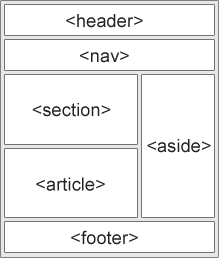
HTML has several semantic elements that define the different parts of a web page: