
HTML Text Formatting
HTML contains several elements for defining text with a special meaning.
Example
This text is bold
This text is italic
This is subscript and superscript
|
1 2 3 4 5 6 7 8 9 10 |
<!DOCTYPE html> <html> <body> <p><b>This text is bold</b></p> <p><i>This text is italic</i></p> <p>This is<sub> subscript</sub> and <sup>superscript</sup></p> </body> </html> |
HTML Formatting Elements
Formatting elements were designed to display special types of text:
<b>– Bold text<strong>– Important text<i>– Italic text<em>– Emphasized text<mark>– Marked text<small>– Smaller text<del>– Deleted text<ins>– Inserted text<sub>– Subscript text<sup>– Superscript text
Example
HTML <b> and <strong> Elements
The HTML <b> element defines bold text, without any extra importance.
|
1 |
<b>This text is bold</b> |
The HTML <strong> element defines text with strong importance. The content inside is typically displayed in bold.
|
1 |
<strong>This text is important!</strong> |
HTML <i> and <em> Elements
The HTML <i> element defines a part of text in an alternate voice or mood. The content inside is typically displayed in italic.
|
1 |
<i>This text is italic</i> |
The HTML <em> element defines emphasized text. The content inside is typically displayed in italic.
|
1 |
<em>This text is emphasized</em> |
HTML <small> Element
The HTML <small> element defines smaller text:
|
1 |
<small>This is some smaller text.</small> |
HTML <mark> Element
The HTML <mark> element defines text that should be marked or highlighted:
|
1 |
<p>Do not forget to buy <mark>milk</mark> today.</p> |
HTML <del> Element
The HTML <del> element defines text that has been deleted from a document. Browsers will usually strike a line through deleted text:
|
1 |
<p>My favorite color is <del>blue</del> red.</p> |
HTML <ins> Element
The HTML <ins> element defines a text that has been inserted into a document. Browsers will usually underline inserted text:
|
1 |
<p>My favorite color is <del>blue</del> <ins>red</ins>.</p> |
HTML <sub> Element
The HTML <sub> element defines subscript text. Subscript text appears half a character below the normal line, and is sometimes rendered in a smaller font. Subscript text can be used for chemical formulas, like H2O:
|
1 |
<p>This is <sub>subscripted</sub> text.</p> |
HTML <sup> Element
The HTML <sup> element defines superscript text. Superscript text appears half a character above the normal line, and is sometimes rendered in a smaller font. Superscript text can be used for footnotes, like WWW[1]:
|
1 |
<p>This is <sup>superscripted</sup> text.</p> |
HTML Quotation and Citation Elements
In this chapter we will go through the <blockquote>,<q>, <abbr>, <address>, <cite>, and <bdo> HTML elements.
HTML <blockquote> for Quotations
The HTML <blockquote> element defines a section that is quoted from another source.
Browsers usually indent <blockquote> elements.
Example
|
1 2 3 4 5 6 7 8 9 10 11 12 |
<!DOCTYPE html> <html> <body> <p>Here is a quote from WWF's website:</p> <blockquote cite="http://www.worldwildlife.org/who/index.html"> For 60 years, WWF has worked to help people and nature thrive. As the world's leading conservation organization, WWF works in nearly 100 countries. At every level, we collaborate with people around the world to develop and deliver innovative solutions that protect communities, wildlife, and the places in which they live. </blockquote> </body> </html> |
Result
Here is a quote from WWF’s website:
For 60 years, WWF has worked to help people and nature thrive. As the world’s leading conservation organization, WWF works in nearly 100 countries. At every level, we collaborate with people around the world to develop and deliver innovative solutions that protect communities, wildlife, and the places in which they live.
HTML <q> for Short Quotations
The HTML <q> tag defines a short quotation.
Browsers normally insert quotation marks around the quotation.
Example
|
1 2 3 4 5 6 7 8 9 10 |
<!DOCTYPE html> <html> <body> <p>Browsers usually insert quotation marks around the q element.</p> <p>WWF's goal is to: <q>Build a future where people live in harmony with nature.</q></p> </body> </html> |
WWF’s goal is to: Build a future where people live in harmony with nature.
HTML Quotation and Citation Elements
| <abbr> | Defines an abbreviation or acronym |
| <address> | Defines contact information for the author/owner of a document |
| <bdo> | Defines the text direction |
| <blockquote> | Defines a section that is quoted from another source |
| <cite> | Defines the title of a work |
| <q> | Defines a short inline quotation |
HTML <abbr> for Abbreviations
The HTML <abbr> tag defines an abbreviation or an acronym, like “HTML”, “CSS”, “Mr.”, “Dr.”, “ASAP”, “ATM”.
Marking abbreviations can give useful information to browsers, translation systems and search-engines.
Tip: Use the global title attribute to show the description for the abbreviation/acronym when you mouse over the element.
Example
|
1 |
<p>The <abbr title="World Health Organization">WHO</abbr> was founded in 1948.</p> |
Result
The WHO was founded in 1948
HTML <address> for Contact Information
The HTML <address> tag defines the contact information for the author/owner of a document or an article.
The contact information can be an email address, URL, physical address, phone number, social media handle, etc.
The text in the <address> element usually renders in italic, and browsers will always add a line break before and after the <address> element.
Example
|
1 2 3 4 5 6 7 8 9 10 11 12 13 14 15 16 |
<!DOCTYPE html> <html> <body> <p>The HTML address element defines contact information (author/owner) of a document or article.</p> <address> Written by John Doe.<br> Visit us at:<br> Example.com<br> Box 564, Disneyland<br> USA </address> </body> </html> |
Result
The HTML address element defines contact information (author/owner) of a document or article.
Written by John Doe.Visit us at:
Example.com
Box 564, Disneyland
USA
HTML <cite> for Work Title
The HTML <cite> tag defines the title of a creative work (e.g. a book, a poem, a song, a movie, a painting, a sculpture, etc.).
Note: A person’s name is not the title of a work.
The text in the <cite> element usually renders in italic.
Example
|
1 2 3 4 5 6 7 8 9 10 11 12 |
<!DOCTYPE html> <html> <body> <p>The HTML cite element defines the title of a work.</p> <p>Browsers usually display cite elements in italic.</p> <img src="img_the_scream.jpg" width="220" height="277" alt="The Scream"> <p><cite>The Scream</cite> by Edvard Munch. Painted in 1893.</p> </body> </html> |
Result
The HTML cite element defines the title of a work.
Browsers usually display cite elements in italic.
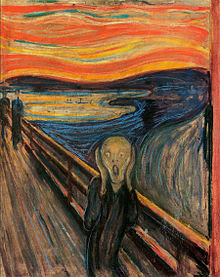
The Scream by Edvard Munch. Painted in 1893.
HTML <bdo> for Bi-Directional Override
BDO stands for Bi-Directional Override.
The HTML <bdo> tag is used to override the current text direction:
Example
|
1 2 3 4 5 6 7 8 9 10 |
<!DOCTYPE html> <html> <body> <p>If your browser supports bi-directional override (bdo), the next line will be written from right to left (rtl):</p> <bdo dir="rtl">This line will be written from right to left</bdo> </body> </html> |
If your browser supports bi-directional override (bdo), the next line will be written from right to left (rtl):
This line will be written from right to left